Faster, safer patient matching
Care coordinators at Dialogue spent 2–3 minutes matching each incoming medical fax to the right patient. I redesigned search around what faxes actually contain, cutting that to about 60 seconds without waiting on a backend rebuild.
- The tension
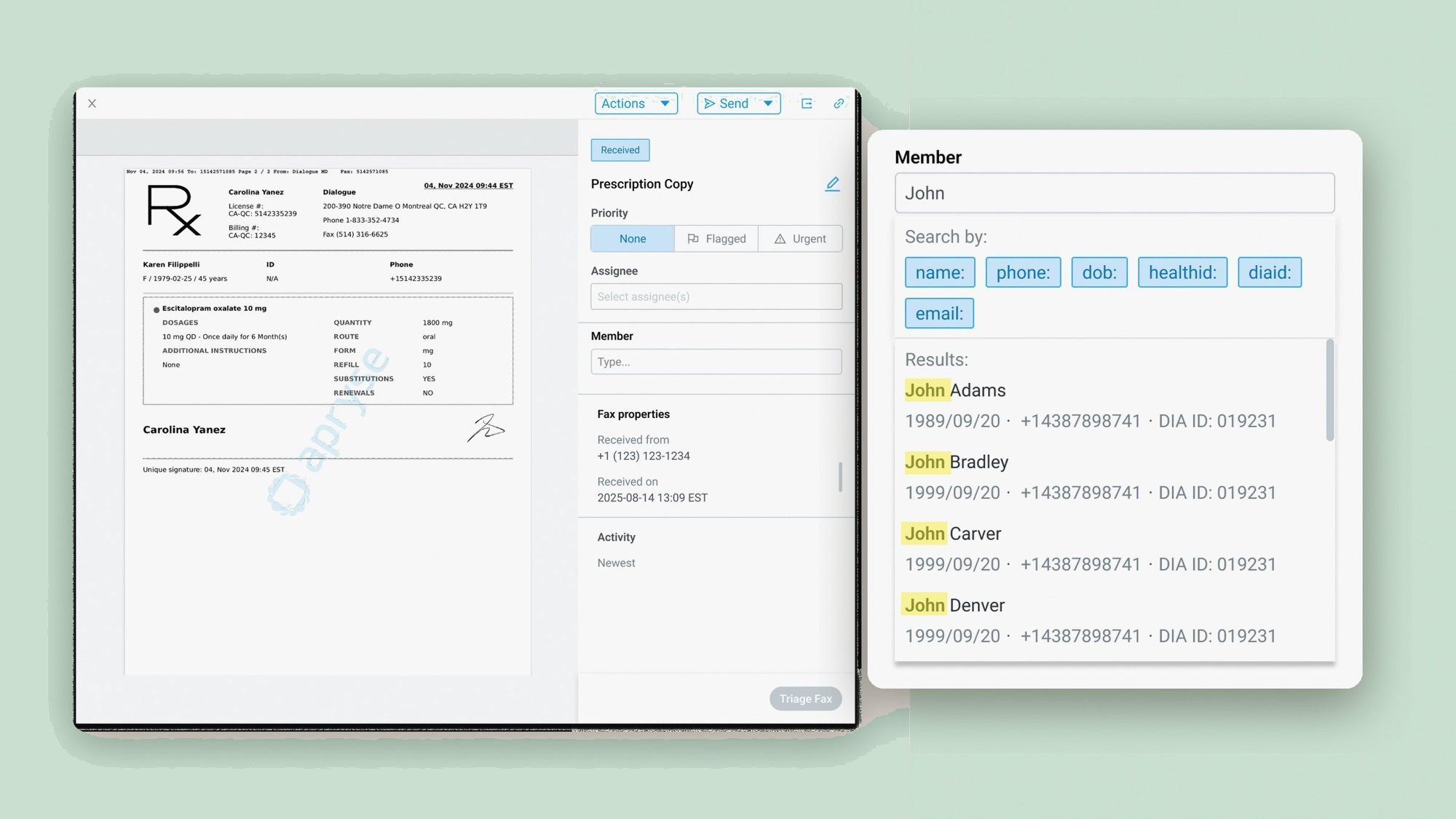
- Faxes included a phone number and Health ID. Search accepted several fields, but coordinators couldn't search by either of those. Common names returned multiple duplicate results, and a wrong match is a privacy breach.
- The turn
- Making phone and ID searchable "properly" was a 6+ month backend project. Instead I designed prefix search, which lets the existing system query the right field today.
- Where it landed
- Matching dropped from 2–3 minutes to ~60 seconds, phone became 85% of all searches, and wrong-patient matches stayed under 1%.
Problem
The search didn't match the paperwork
Coordinators triage 100+ medical faxes a day, and every one followed the same slow loop:
- A fax arrives with patient details, usually a name, birthdate, phone number and Health ID.
- The coordinator searches by name and birthdate in most cases, and gets several possible matches.
- To tell them apart, they open each candidate's profile in a new tab and read through it.
- They check the phone number and Health ID against the fax until one patient fits.
"I wish we could search by phone number at the least. It'd make my life so much easier."Mariah, Care Coordinator
Research
The real problem was confidence
Two weeks embedded with the care coordination team showed it wasn't about search speed.
- 1
The search fields didn't match the faxes.
90% of faxes carried a phone number or Health ID, and neither was searchable.
- 2
Telling patients apart was the hard part.
Finding candidates was easy; narrowing a common name down to one person was not.
- 3
Coordinators optimized for safety, not speed.
Fear of a wrong match drove the extra tabs and double-checks.
The constraint. Phone numbers and Health IDs lived in a separate legacy database the search couldn't read. Unifying them was a 6+ month backend project, so the design had to work around it, not wait for it.
How might we let coordinators search by phone and Health ID now, using the system we already have?
Exploration
Three ways to pick a field
I took three concepts to the team, each a different answer to one question: how does a coordinator tell search which field to look in?
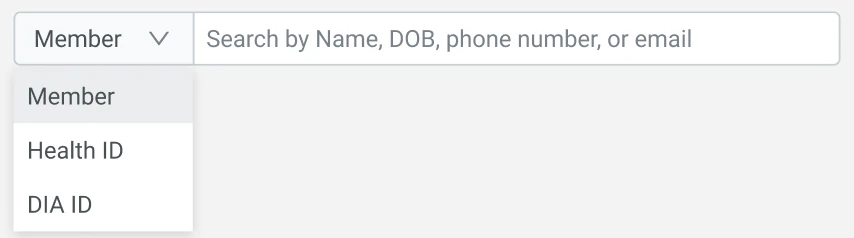
Pre-tab dropdown
An Ant Design input variant with a field picker in front: Member, Health ID or DIA ID.
- Lightweight to build on an existing component
- Precise: search knows exactly which field to query
- But every search starts with a menu, 100+ times a day

Radio buttons
The same choice, laid out in the open: Member info or Health ID, set before you type.
- Options visible at a glance, no menu to open
- Still a choice before every search
- Adds height to an already dense triage panel
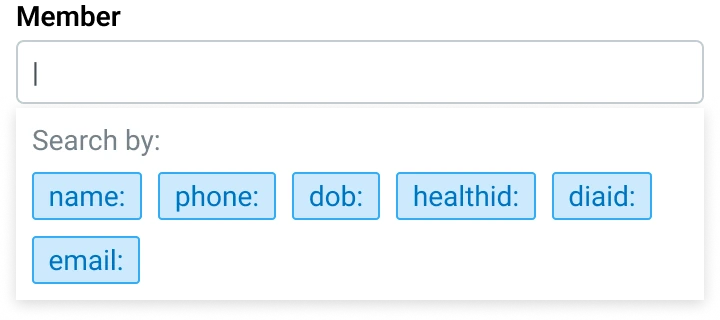
Prefix search
One box. Type or pick a prefix like phone: or healthid: before the value.
- Name search works exactly as before
- Experts skip straight to the field they need
- Invisible until learned, so the prefixes show on focus
All three were buildable without the database rebuild. Prefix search won because it kept the default search exactly as it was and added no step for the common case, while the other two put a choice in front of every one of 100+ daily searches.
usability sessions answered the pushback
Our CTO and PM worried prefixes would mean a steep learning curve. I answered with evidence: before launch, coordinators triaged a test fax with the prototype. Most clicked into search, saw the prefixes, picked phone:, pasted the number and found the patient, unprompted. They called it useful and faster than their old routine.
Solution
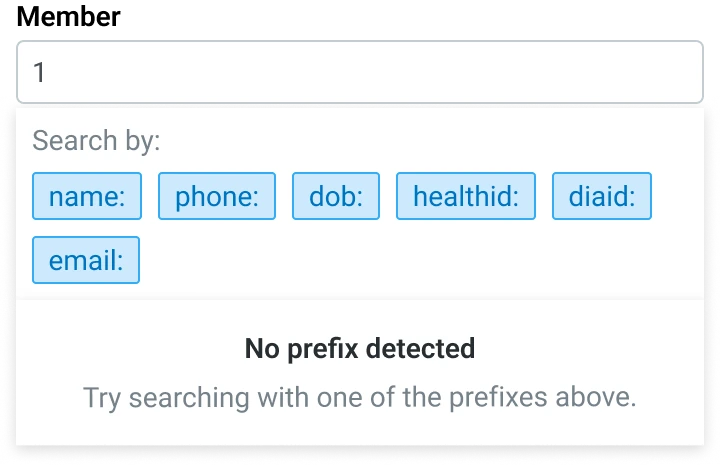
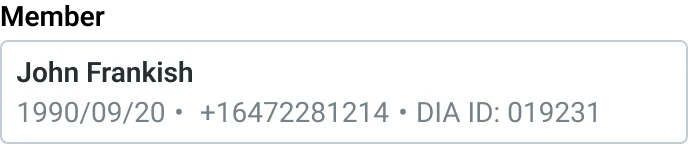
Type or pick a prefix. Search looks in the right field.
No new screens, no backend rebuild. Try it below: it plays on its own, and takes over the moment you click in.
Search by:
Click into the field, and the prefixes appear.
| Type this | Search does this |
|---|---|
John | Name search, unchanged |
phone: 6472281214 | Matches the phone number |
dob: 1990/09/20 | Matches the date of birth |
healthid: FRAJ 9009 | Matches the Health ID |
diaid: 019231 | Matches the Dialogue ID |
email: john@ | Matches the email |
name: john phone: 647 | Stacks filters to narrow a common name |
Every state, specified

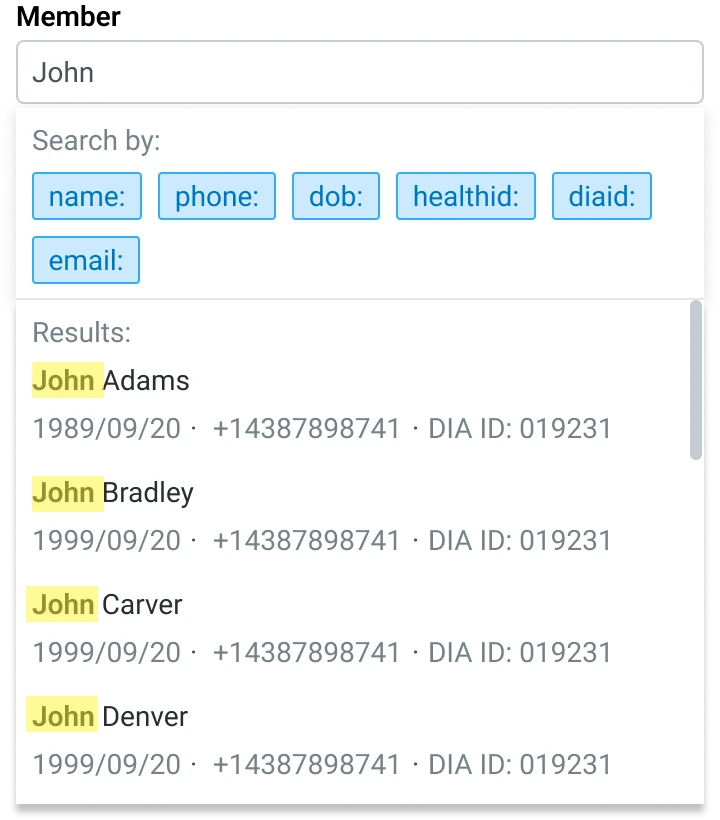
Three principles, each answering a research finding
Simple by default, faster for experts
Plain name search works as before, and clicking into the box shows the prefixes.Show why it matched
Every result highlights what matched, so coordinators can trust it without opening extra tabs.Guide, don't guess
Input search can't read safely gets a nudge toward the right prefix, never a risky match.
What I owned, end to end: interaction specs for every state, a reusable "matched field" highlight component, screen-reader announcements for matches, responsive behaviour, and a developer handoff annotated with edge cases.
Impact
Confidence, then speed
The biggest win was confidence: coordinators could see why a result matched, so they assigned each fax to the right patient without double-checking in other tabs.
The project was part of Dialogue's cost-saving initiative, and the business case was simple: give coordinators back the time matching took from them. The 1–2 minutes saved on every fax add up to about $15k a year, time coordinators now put into more impactful work. Faster matching also cut an estimated 2–4 hours from urgent referral response, and the team absorbed growing fax volume without adding headcount.
"You don't know how amazing this is. Our team is blasting through triaging now."James, Care Coordinator
Reflection
Respect the constraint, ship the value
A solution that respects the constraint can deliver value months before the "right" fix. Prefix search shipped in 4 months; the database rebuild would have taken 6+ just to start helping.
What I'd do differently
Measure the mismatch rate before launch. Because a breach could bring fines for Dialogue, error rate was the number the organization cared about most. Under 1% is strong, but a pre-launch baseline would show how much safer matching became.
Settle concerns with a test, not a debate. Six usability sessions answered the learning-curve worry better than any argument could, and I'd bring testing in that early on every project.
What's next
Early OCR tests hit ~95% accuracy for auto-assigning faxes, which could remove manual matching for most of them. Once the databases are unified, search could detect a phone number or ID on its own, and the prefixes could quietly retire.